Frosty's Dumbass Notes Scouting Sheet
Overview
This sheet was designed by me to fully scout entire tiers and get an idea of tracker data alongside who is available. This functions with multiple scripts and there's a weird workflow to it.
URL
Tabs
Dashboard
- Ignore it
[TierName]
- Tier rostered players get put on top (manual process)
- Tier Availables get dynamically filled any time the sheet is modified via the script called
copyFilteredDataForAllTiers. - The data is dynamically pulled from the
[TierName] Importtab and the script filters the players via Contracts sheet to only show Draft Eligibles and Free Agents.
VERY IMPORTANT NOTE: Due to the nature of how this workflow works, the rows are dynamically moved into the section BUT NOT MODIFIED. Therefore, any changes you want to make (such as editing tracker data or changing a Status) must be made on the [TierName] Import tab.
[TierName] Import
- The player data (Name, RSC ID, Tier, MMR, Status) are pulled from the Contract Import tab by the script called
populateTierDataImportSheets. This is a one-time run to popular the data into all the[TierName] Importtabs. - Tracker numbers, Mechanics, Game Sense, and Notes are all statically set by you and are not pulled from anywhere.
Tryout Rotations
- Ignore it
Contract Import
- Self explanatory, it pulls the Contract sheet from the URL in
Constants.
Tier Maker Import
- The goal was to originally make this much more automatic to work with the Tier Maker and Contracts. However, this was abandoned because it became untenable as people moved tiers so often. Thus, I came up with the "run this script at one time once numbers settle", which is pretty good but not perfect as people do move post-lock.
Active Contract Status
- Honestly I do not remember what this sheet is used for. Check back later.
Constants
- Self-explanatory. All the stuff that'll get pulled from wherever it's needed. The list is a lot bigger than I'm actually using since I just reused the Franchise Manager sheet one.
Workflow Diagram
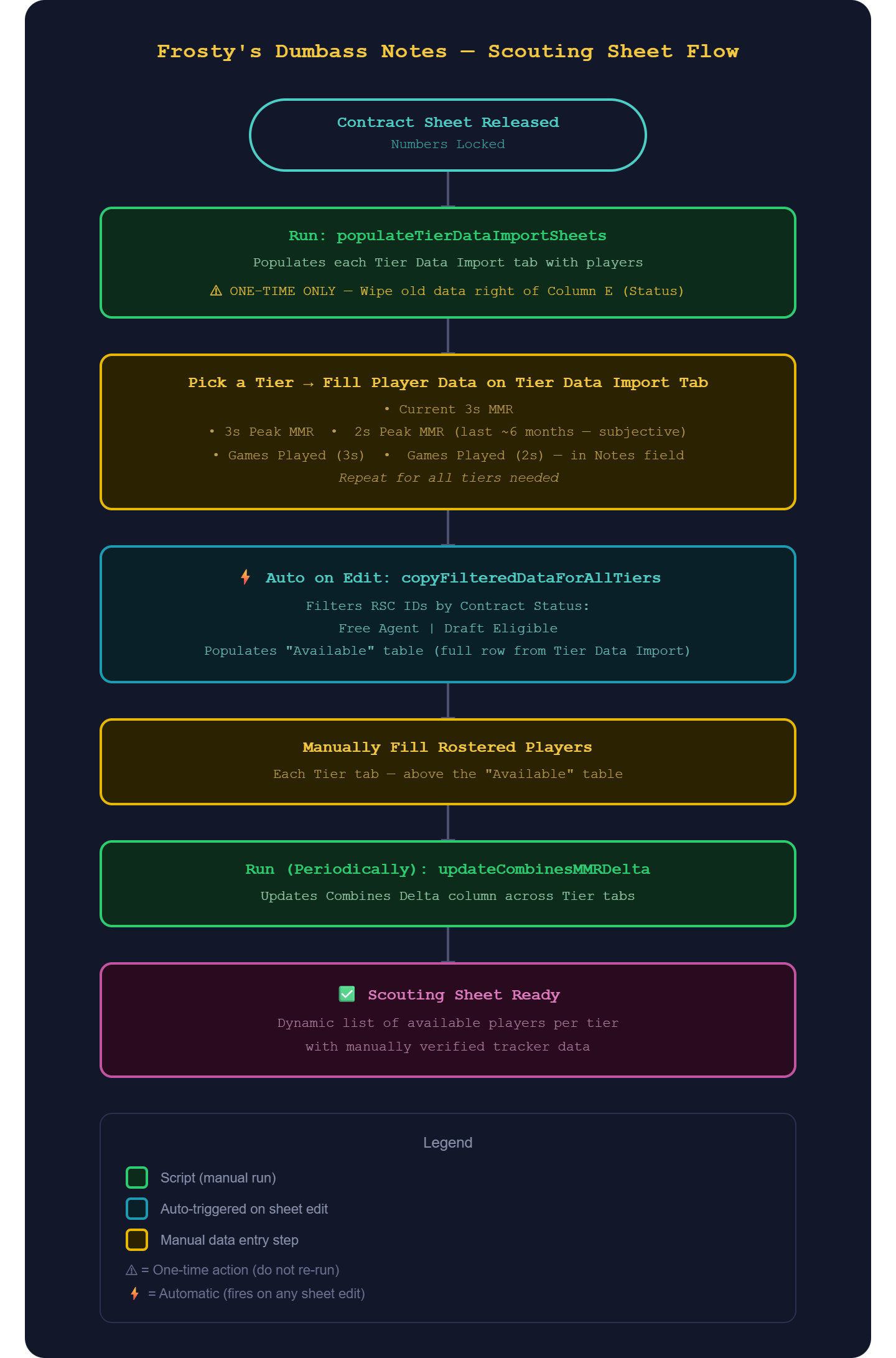
Scripts
Script Name
- What it does:
- How to run:
- Inputs:
- Outputs:
- Notes: